Live Wallpapers, 4K Wallpapers
- 4.4
- Rating
- 10.00M
- Installs
- Free
- Price

 Analysis by App-foxy
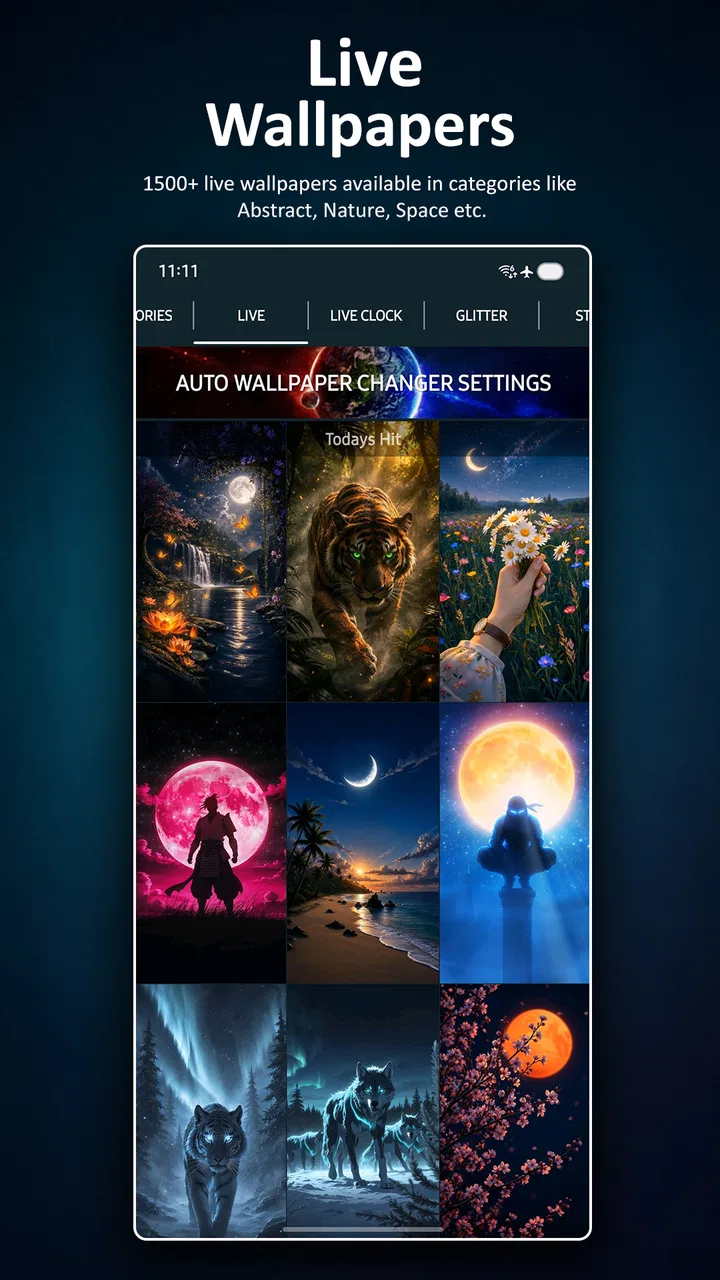
I noticed Live Wallpapers, 4K Wallpapers because it tries to solve two different personalization needs in one place: making the screen move and making it look sharp without motion. After spending time switching between its live, glitter, clock, and static wallpaper options, I found that its strongest quality is variety. It is easy to enjoy during the first few days, but the more important question is whether it remains useful once the novelty wears off. My answer is yes for people who like changing their phone’s appearance regularly, although it is not the best fit for anyone who wants a completely hands-off setup.
This is a free personalization app from HD Pro Walls, available for Everyone and compatible with Android 6.0 or later. It has reached over 10 million installs, with a 4.5 average from around 48 thousand ratings and roughly 2.4 thousand written reviews. Those figures suggest that it has found a broad audience, but they do not tell the whole story. The real experience depends on whether you prefer animated backgrounds, crisp static images, or a rotating mixture of both.
From the first week of experimenting to a lasting wallpaper routine
I found the first week most useful as a chance to learn which wallpaper styles fit my screen and habits, rather than as a race to try every design. Once I knew whether I preferred a quiet static image, a clock-centered layout, or occasional motion, it became easier to make changes with a purpose. That shift—from experimenting to choosing deliberately—is what turns a brief novelty into a lasting wallpaper routine.
You May Also Like

 Blood Strike: 2.5 Anniversary
Blood Strike’s Loadouts Turn Every Drop Into a Tactical Gamble
A close look at Blood Strike’s custom loadouts: how fast access to signature weapons reshapes its battle royale rhythm, rewards preparation, and narrows the gap between fights.

 Pandora - Music & Podcasts
Pandora’s Music Is Easy to Start, but Harder to Recover
Pandora’s strength is its low-effort path from a seed to a station. Its weak spot is how much confidence it asks you to place in connection, setup, and quiet recovery.

 8 Ball Pool
 Is Built on Rivalries, Rematches, and Routine
A close look at the rivalries, rematches, shared routines, and unanswered safety questions that turn a quick pool match into a persistent mobile community.

 Samsung Music
’s Quiet Strength Is Playing What You Already Own
Its reach comes less from spectacle than from dependable access to a personal library. That simplicity is both the app’s strongest retention engine and its ceiling.

 AccuWeather: Weather Radar
AccuWeather Review: A Quick, Clear Forecast for Everyday Decisions
For everyday plans, the best forecast is the one you can understand quickly. AccuWeather makes rain timing, radar, and local conditions easy to act on, with a few trade-offs.

 Hill Climb Racing
Why Hill Climb Racing Still Turns Crashes Into One More Run
A tiny car, a bumpy hill and one more upgrade: Hill Climb Racing keeps resurfacing because its simple chaos makes every near-miss feel personal.
More From Our News Desk



The first impression comes from choice rather than complexity
The app’s appeal is immediate because I can approach it in several ways. If I want movement, I can look at live wallpapers. If I prefer something more decorative, glitter-style designs offer a different mood. Clock wallpapers make the lock or home screen feel more like a visual display, while static 4K backgrounds are the safer choice when I want detail without animation. The combination makes the app feel less limited than a collection focused on only one wallpaper type.
I especially liked having a way to change the personality of my phone without changing icons, widgets, or the entire launcher. A dark, restrained image can make a workday setup feel calmer, while a brighter animated design can make the same device feel more playful in the evening. That kind of small change is the main reason I think this app works well as a personalization tool rather than something people open constantly.
The free starting point also lowers the risk of trying it. I can browse the available styles before deciding whether the app deserves a permanent place on my device. There are in-app purchases ranging from $5.99 to $34.90 per item, so I would not treat every option as automatically part of the free experience. For a casual user, the sensible approach is to explore first and only consider paying if a particular style or extended use genuinely becomes part of a routine.
Live backgrounds are attractive, but they need the right setting
Live wallpapers create the strongest first-week effect. They make the phone feel less static, especially when the animation has a gentle pace or a visual theme that matches the device. I found them most enjoyable when used selectively rather than changed every few minutes. A good moving background can make unlocking the phone feel fresh; too many dramatic changes can make the screen seem busy and reduce the sense that the phone belongs to me.
There is also a practical trade-off. Animated backgrounds are more visually demanding than a still image, and I would not choose one if my priority were maximum simplicity or the least possible distraction. The app is better suited to someone who sees the wallpaper during frequent unlocks and enjoys that small moment of visual feedback. If you rarely look at the home screen or keep your phone in battery-saving modes, a static option will probably deliver more consistent value.
One useful habit is to treat live wallpapers as occasional themes instead of permanent decoration. I might use one for a weekend, a holiday, or a change of season, then return to a static image when I want the phone to feel quieter. This prevents the animation from becoming background noise. It also gives the app a recurring role: not something I constantly manage, but a place I revisit when my current look starts feeling stale.
Static 4K images are the dependable part of the experience
The static wallpaper side is easier to live with over time. A sharp image can remain attractive for weeks because it does not demand attention every time I unlock the device. It is also more flexible: I can choose a detailed scene, a simple texture, or a darker composition depending on how clearly I want icons and text to stand out.
My practical advice is to judge a wallpaper from the home screen, not only from its preview. A beautiful image can become frustrating if bright details sit behind app labels or if the central subject is hidden by widgets. I look for open areas where icons remain readable, then check whether the image still feels balanced after cropping. This is one of the app’s less obvious decisions: the best-looking preview is not always the most usable daily background.
Static choices are also the better route for people who want a consistent professional appearance. A clean image can make a personal phone feel organized without drawing attention in a meeting, classroom, or shared workspace. In that situation, the app competes well with the default wallpaper gallery because it offers more visual directions while keeping the setup simple.
Clock wallpapers change the role of the screen
Clock wallpapers are interesting because they are not only decorative. They can make the screen feel like a compact display, particularly for someone who checks the phone frequently for the time. I would use this style when the clock itself is part of the visual design, not when I already rely heavily on a separate clock widget and want the home screen to stay minimal.
The trade-off is visual competition. A clock design may look excellent by itself but clash with a busy icon layout. Before settling on one, I would temporarily reduce unnecessary widgets and check whether the clock remains legible against the rest of the screen. This makes the feature more useful than simply choosing the most elaborate design available.
A realistic everyday scenario
Imagine I am starting a new work week. On Monday morning, I choose a restrained static 4K image with an uncluttered area for icons. By Friday, I am tired of seeing it, so I switch to a subtle live wallpaper for the weekend. On Sunday evening, I use a clock wallpaper while reorganizing my home screen, then return to a darker static image before work begins again. This routine takes only a few minutes, but it gives the app a purpose beyond the first burst of experimentation.
That is where I see the lasting value. The app does not need to become a daily destination. It only needs to make occasional changes easier and more varied than the built-in wallpaper picker. For users who enjoy refreshing their phone with the seasons, moods, or routines, that is a realistic reason to keep it installed.
What happens after the novelty fades
After the initial excitement, I stopped judging the app by how many designs I could try and started judging it by how often I actually wanted to change anything. The live effects became less important, while the static and clock categories became more practical. This shift matters because an app can feel impressive during a long browsing session but offer little reason to return.
Here, the recurring value comes from having several visual formats available when I do want a change. I do not need to commit to animation, and I do not need to abandon the app just because I prefer still images most of the time. That flexibility gives it a better chance of surviving beyond the first week than a wallpaper app built around one visual trick.
Maintenance is manageable, but not entirely invisible
The main maintenance burden is personal rather than technical: choosing, testing, and eventually replacing a background. The more options an app offers, the easier it is to spend too long browsing without finding something that works well with the rest of the phone. I recommend deciding what mood or function I want before opening the catalog. “Calm and readable” produces a better result than scrolling aimlessly through attractive previews.
I also keep a small mental shortlist of wallpaper types that have worked well. For example, a darker static image is useful when I want icons to stand out, while a clock design is better when the screen itself should provide a quick visual cue. This prevents the app from turning into a cycle of constant switching. Personalization is more satisfying when each change has a reason.
The app’s current version is 5.7.1, and it was released on June 29, 2019. For me, the important point is not the age of the product but whether the current experience remains comfortable on a compatible device. Anyone using older Android hardware should be more selective with animated choices and should pay attention to how the phone feels after applying them. A static alternative is available within the same app, which makes that adjustment easier.
Where visual fatigue starts
Glitter and motion can be fun in short sessions, but they are also the styles most likely to become tiring. A wallpaper that feels exciting on day one may feel distracting after repeated unlocks. I would avoid placing the most intense designs behind a dense home screen because movement, sparkle, icons, and widgets can compete for attention.
Another source of fatigue is inconsistency. If the wallpaper changes too often or looks unrelated to the phone’s icon colors, the device can start to feel messy rather than personalized. I get better results by matching the background to the existing layout instead of rebuilding the entire interface around every new image. This is especially important for people who want the phone to feel polished rather than merely different.
Clock wallpapers can also lose their charm if the time display is difficult to read at a glance. A design that requires careful attention defeats the practical reason for using it. I would choose legibility over decoration and check it in both bright and dim surroundings before deciding it is suitable for long-term use.
How it compares with ordinary alternatives
The default wallpaper picker on a phone is usually faster for making one quick change. It is already integrated into the system, and it avoids adding another personalization app to the device. If I only want a single plain image and never plan to revisit the choice, the built-in option may be enough.
This app becomes more compelling when I want variety across formats. A typical system gallery may offer static images, but it usually does not present live, glitter, clock, and sharp static styles together in a way that encourages experimentation. The advantage is not that every design will suit me; it is that I can move between different kinds of wallpaper without searching through several unrelated tools.
Dedicated live-wallpaper apps may provide a narrower, more specialized experience for people who want one particular animation style. I would choose one of those alternatives if I already knew exactly what visual effect I wanted and cared more about depth in that niche than about having multiple categories. This app is strongest as a broad wallpaper toolbox, not as a specialist studio for one specific look.
Who should install it, and who should pass
I recommend it to Android users who enjoy changing their phone’s appearance every few weeks, want both animated and static choices, or like matching the screen to a mood or occasion. It is also useful for someone who has grown bored with the system gallery but does not want to redesign the whole interface. The free entry point makes it reasonable to test without committing immediately.
I would skip it if I want one wallpaper, no browsing, and no temptation to customize further. It is also a weaker fit for anyone who finds motion or glitter distracting, prefers the lowest-maintenance setup, or uses an older phone where animated backgrounds may feel less comfortable. In those cases, a carefully chosen built-in static wallpaper is likely the better answer.
People who are sensitive to visual clutter should begin with static 4K backgrounds and treat live designs as occasional experiments. People who want a decorative time display should start with the clock section rather than assuming every animated option will be useful. These small decisions make the difference between enjoying the app and abandoning it after a long first session.
My long-term verdict
After the novelty fades, Live Wallpapers, 4K Wallpapers earns its place mainly through flexibility. I do not think every user needs it permanently installed, and I would not recommend paying for extras before discovering a genuine long-term preference. Still, the mixture of live, glitter, clock, and static 4K styles gives it more staying power than a wallpaper app built around one effect.
My favorite way to use it is conservatively: choose a readable static background for everyday use, keep a live design for occasional changes, and use clock wallpapers only when they improve the screen rather than crowd it. That approach keeps maintenance low and makes each change feel intentional. The app works best when it supports a habit of occasional renewal instead of encouraging endless scrolling.
For a free personalization app from HD Pro Walls, its broad appeal is understandable. It gives me enough variety to refresh a familiar phone without forcing a complicated setup, while still allowing me to ignore the more energetic styles. If your idea of customization is a new visual mood from time to time, I think it is worth trying. If your ideal phone is deliberately static and untouched, the built-in wallpaper tools will probably serve you better.
FAQs for Live Wallpapers, 4K Wallpapers
01What are the main features of the Live Wallpapers, 4K Wallpapers app?
The Live Wallpapers, 4K Wallpapers app offers a vast collection of high-quality wallpapers in 4K resolution, providing an immersive experience with vibrant colors and dynamic scenes. It includes categories like nature, abstract, and urban landscapes. Users can customize their home and lock screens with ease and regularly receive new content updates.
02Is the Live Wallpapers, 4K Wallpapers app free to use?
The app offers a basic version for free, allowing access to a limited selection of wallpapers. However, it includes in-app purchases or a subscription model to unlock premium features, such as exclusive 4K content, ad-free browsing, and early access to new wallpapers. Pricing details are available in the app store.
03How does the app affect battery life and device performance?
Live wallpapers can be more demanding on battery life compared to static images, as they continuously animate your screen. However, the app is optimized to minimize battery consumption and impact on device performance. Users can manage settings to balance visual quality with energy efficiency, ensuring a smooth experience.
04Can I set different wallpapers for home and lock screens?
Yes, the app allows you to set different wallpapers for your home and lock screens. This feature enables users to personalize their devices further by selecting distinct images for each screen. The user-friendly interface makes it easy to apply and switch between wallpapers with just a few taps.
05Are the wallpapers available offline once downloaded?
Once you download a wallpaper, it is stored on your device, allowing you to access and set it offline without needing an internet connection. This feature is convenient for users who want to save data or access their favorite images when not connected to Wi-Fi or mobile networks.
Pros
- Stunning 4K quality visuals.
- Wide variety of wallpaper categories.
- Smooth app performance.
- User-friendly interface.
- Regular updates with new content.
Cons
- High battery consumption.
- Contains in-app advertisements.
- Limited features without premium.
- Requires internet for updates.
- May slow down older devices.

Live Wallpapers, 4K Wallpapers
Gallery